$9.99 monthly or $99 annually. Invitation-only pilot. Your AI accounts stay yours.
The work is complicated. Catching up shouldn’t be.
Actual app screenshots with demonstration data. Development preview; earlier FleetDeck branding may appear.
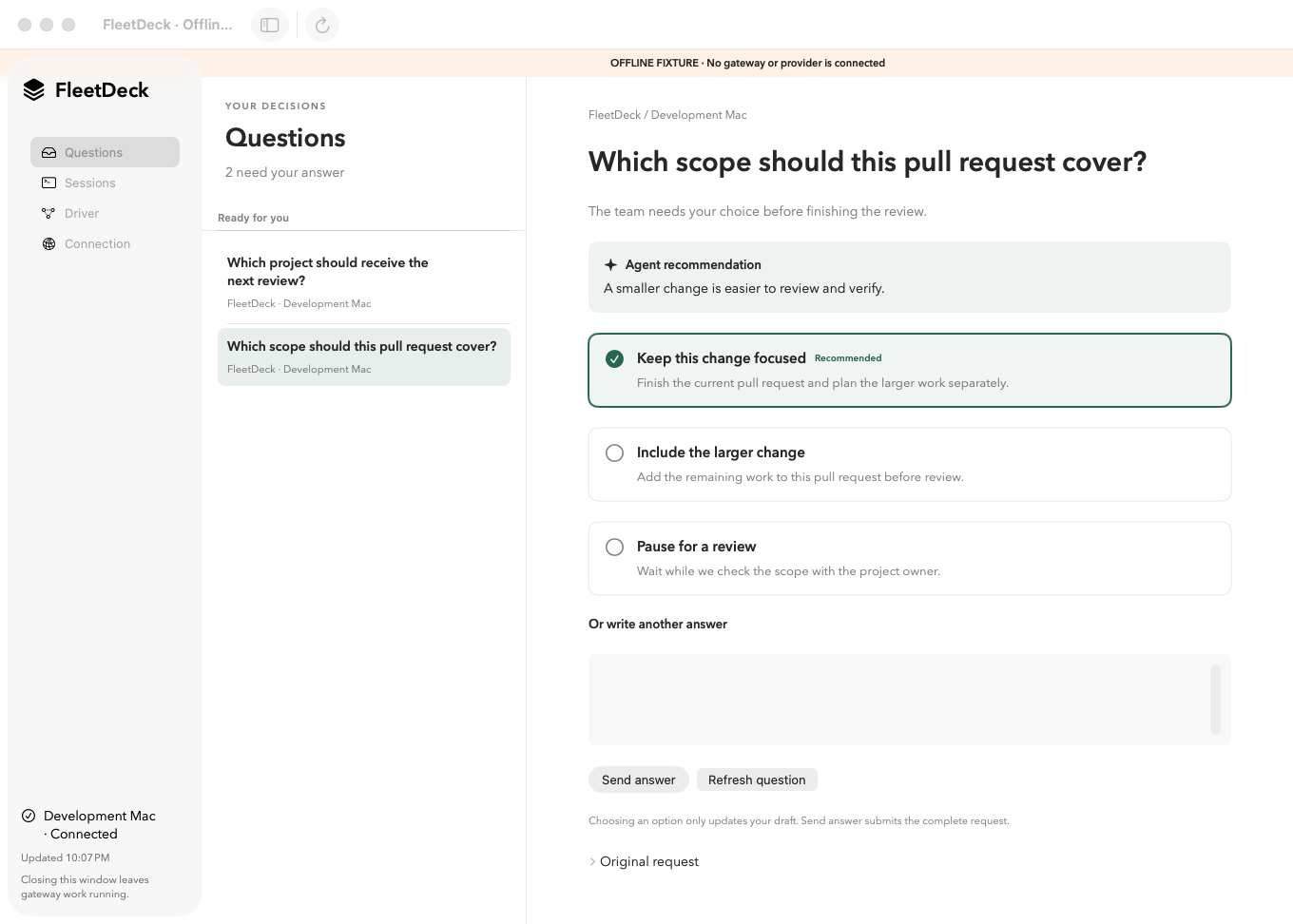
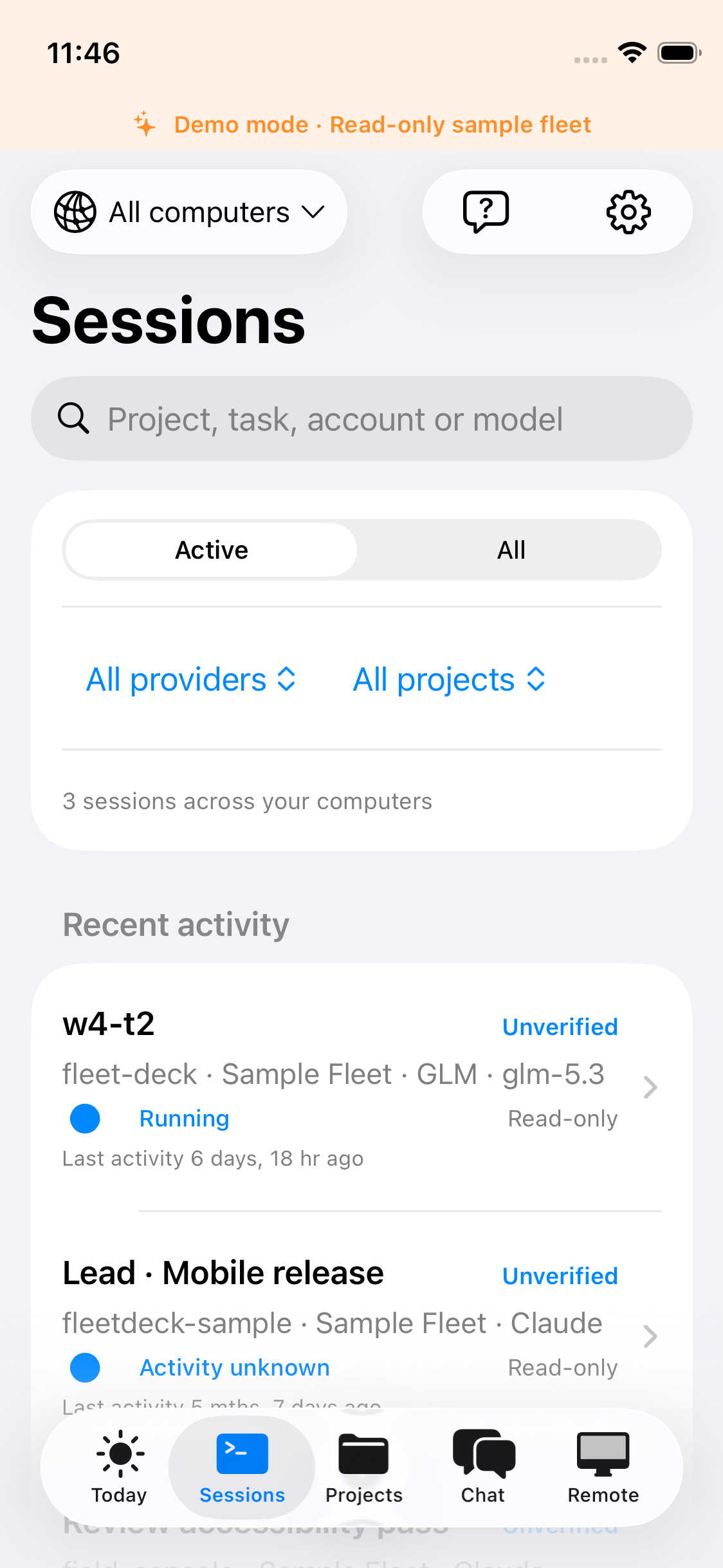
Mac · QuestionsReview the recommendation, compare the options, and send your answer while the queue stays in view.iPhone · SessionsFind supported coding sessions without returning to every terminal.
For the moments between writing code.
An agent needs a choice. You need the context.
A change is ready for review, but its scope needs your decision. Read the project question and the author’s recommendation, compare the available options, and answer one question at a time.
Supported questions keep the rest of the queue visible. Notices that do not support a reply stay informational.
Several sessions. One next step.
You have coding work spread across projects and computers. Browse the sessions your connected hosts report, then open the one you need instead of hunting through terminal tabs.
Freshness and coverage matter: Desk distinguishes process observations from sessions with supported actions.
Send the screenshot. Keep the conversation moving.
On iPhone, attach photos or files to supported sessions or fleet chat through your connected host. Download shared files and available project files to save or share when you need the result back.
File access follows the conversation or project you’re working in. Your host must be reachable; this does not add conversation input to the Mac preview.
Bring your tools. Start with one workflow.
We help you confirm the fit before you pay for the pilot.
01
Tell us how you work.
Share your coding tools, devices, and the questions or sessions you want to review. We confirm the supported setup and access path.
02
Connect your host.
Pair the app with your configured gateway. Your provider accounts and permissions remain under your control.
03
Pick up the next step.
Review a question, inspect a session, or check status. The app shows the actions supported by that source and its current state.
Your AI tools. Your provider accounts.
Start with Codex and Claude Code; expand with supported provider setups. A subscription through a coding tool and a separately billed API are different routes. We confirm the route you actually use.
OpenAI CodexEstablished integration
Existing local account and session bridges. Use supported Codex sign-in with an eligible subscription, or a separately billed API setup. Codex account options
Anthropic Claude CodeEstablished integration
Supported local Claude Code sessions and account setups. Subscription access follows Anthropic’s plan limits; API use is billed separately. Claude subscription usage
Grok Build · xAIConditional integration
An owned-session adapter requires a compatible local Grok Build setup and eligible account. The metered xAI API worker route is separate; a Grok subscription is not API credit. Grok Build eligibility
z.ai · GLM Coding PlanLocal worker route
An existing Claude Code worker setup can use the GLM Coding Plan. A native Desk provider adapter is planned; this is not the same as full native session control. GLM Coding Plan setup
Gemini CLI · Kimi CodeConditional integrations
Owned-session adapters are implemented for compatible local setups. Account eligibility and available actions are confirmed individually, rather than assumed from a consumer subscription.
Qwen Code · Sakana FuguPlanned Desk integrations
These are not part of the confirmed pilot offer. Ask about your workflow; we’ll distinguish what is available from what is still being built.
AI plans and model usage are not included with Desk. Your provider bills the route you select. Automatic account rotation and API failover are not included.
Choose the right starting point.
The pilot is configured around your devices, tools, and the actions you need.
Current preview scope
Surface
What you can use
Availability
Mac app macOS 14 or later
Connection, reviewed questions, session observations, and driver status.
Development preview. Conversation input is not available in the desktop app.
iPhone companion Internal TestFlight
Questions and supported session views; actions depend on the connected source.
Internal distribution, not a public App Store release. Customer access is confirmed individually before payment.
Coding tools Provider-specific setup
Supported sessions and process observations from your gateway.
Your host reports its own runtime and source status.
Host setup, network access, authentication, and permissions are required.
Before you bring Desk into your workflow.
What is Cognautic Desk?
Cognautic Desk is a Mac app and iPhone companion for people working across AI coding sessions. Connect your configured gateway to review questions, find supported sessions, and check driver status. Your coding tools run the work; Desk gives you a place to review it.
Can I use my existing Claude or ChatGPT subscription?
Supported Claude Code and Codex setups can use an eligible provider subscription through the provider’s own sign-in. Your plan’s limits and terms still apply. API credentials are a separate route with separate provider billing. Desk early access does not include provider subscriptions, model credits, or API usage.
Does Desk work with Grok and z.ai?
Grok Build has a conditional owned-session integration that requires a compatible local setup and eligible account. Z.ai’s GLM Coding Plan has an existing local Claude Code worker route; a native Desk provider adapter is planned. These routes do not promise the same actions on every device. We confirm your specific setup before an invitation.
Can I send messages from my phone or Mac?
On iPhone, supported sessions can offer input when the connected source and permissions allow it. Conversation input is not available in the desktop app; the Mac preview supports reviewed questions. A detected process does not establish conversation identity or control access.
Is Desk available to download today?
Desk is an invitation-only paid pilot. The Mac app is a development preview and the iPhone app is in Internal TestFlight, not a public App Store release. We confirm compatibility and a ready delivery path before sending a paid invitation. Asking about access is free.
Does my computer need to stay connected?
Your gateway reports the work on its host, so that host must be reachable for current session information and supported actions. Closing the desktop app does not pause it. Desk can flag stale or incomplete sources; an incomplete list does not mean nothing is running.
Does Desk run continuously or switch accounts automatically?
Continuous work and automatic account switching are not available in this preview. Desk does not promise uninterrupted work after a provider reaches its limits. Keep using your provider’s account controls; automatic rotation and API failover are not included in this offer.
How much does Cognautic Desk cost?
Early access costs $9.99 monthly or $99 annually, in USD, with the same preview features on either plan. Bring your own AI accounts. We confirm your setup and delivery before payment; an inquiry does not create a subscription.
Make room for the work that needs you.
Tell us your tools and devices. We’ll confirm compatibility and a ready delivery path before sending a paid invitation.